Cut, laser and CNC ready
Vector Graphics for Vinyl Cutting & Engraving
Clean, production-ready vector files for sign shops, engravers and makers across the U.S., including Georgia and Ohio.
Send us a logo, sketch, photo or low-resolution image. We rebuild it as precise vector graphics for vinyl cutting, laser engraving and CNC work, in a file your machine can read without surprises: closed paths, smooth curves, correct line weights and elements separated the way your production needs them.
Closed paths, no overlapsSmooth curves, minimal nodesElements separated for productionAI, EPS, SVG, PDF and DXF
Upload JPG, PNG, PDF, AI, EPS, SVG or even a phone photo. Files delivered in AI, EPS, SVG, PDF and DXF.
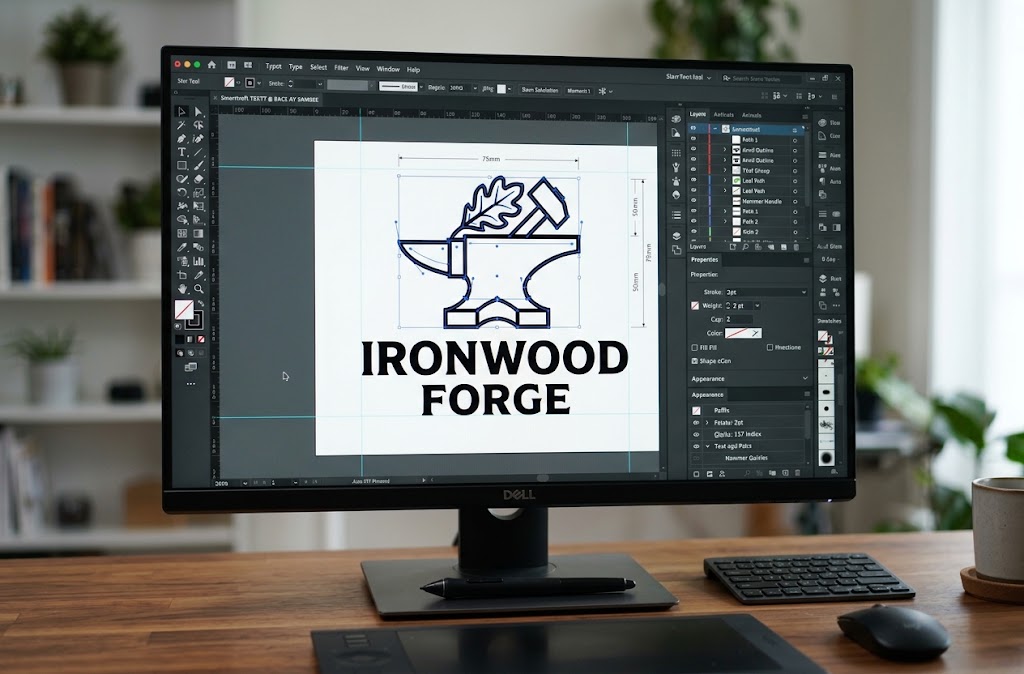
Cut-ready and engrave-ready
Cut-ready and engrave-ready filesClosed paths, no overlaps
AI, EPS, SVG, PDF and DXFAny format your machine reads
Revisions includedUntil it cuts right
You own the final fileReuse it on any job
Before and after
From Blurry Image to Machine-Ready Vector
Most artwork arrives as a screenshot, a JPG pulled from a website or a logo saved at 200 pixels wide. A cutter or laser can't follow pixels. It needs mathematically defined paths. Drag the handle to see what changes when a file is rebuilt for production, not just traced.
Original low-res JPGProduction vector
Pixels become pathsEvery edge is a precise curve your blade or laser can follow.
Closed shapes, no overlapsNo double cuts, stray nodes or open lines on the machine.
Any size, same sharp edgeFrom a 2-inch decal to a 6-foot sign without a redraw.
Vinyl cutting
What Are Vector Graphics for Vinyl Cutting?
A vinyl cutter moves a small blade along a path. Vector graphics for vinyl cutting are files where every shape is defined by clean, closed outlines, so the blade knows exactly where to cut. The file tells the machine where each letter, shape and inside cutout begins and ends.
A good vinyl cutting file has no overlapping shapes that make the blade cut twice, no stray points that cause jagged edges and no details too small to weed. It's sized for the real decal, not for a screen.
Closed outlinesNo double cutsEasy to weed
Laser and CNC engraving
What Are Vector Graphics for Engraving?
Laser and CNC engravers read vectors in two ways. Vector engraving or cutting follows lines, like a pen tracing an outline. Fill or raster engraving marks the area inside closed shapes. Engraving vector files must be set up for the method your machine will use.
That means deciding which parts are cut lines, which are score or outline lines and which are filled areas. It also means checking that line thickness and spacing will survive the material, whether that's a soft wood, anodized aluminum or glass.
Cut, score and fill setSized for the material
Our services
Vector Services for Cutting and Engraving
Each file is prepared for the machine it's going to, because a vinyl plotter, a laser and a CNC router read the same artwork very differently.
Vinyl cutting vector files
For sign shops, decal makers, vehicle and window graphics, sticker and label production, and heat transfer vinyl (HTV) for apparel.
- Closed, single-layer cut paths with no double cutting
- Text converted to outlines so fonts never go missing
- Layered color separations for multi-color vinyl, with registration in mind
- Mirrored versions for HTV on request
- Weeding-friendly detail: tiny islands and hairline gaps fixed before they cost you material
Laser engraving vector artwork
For CO2, fiber and diode laser shops working on wood, acrylic, leather, glass, coated metals, trophies, awards and promo products.
- Artwork split into cut, score and engrave layers, colored the way your software expects
- Hairlines set for vector cutting; filled shapes set for raster engraving
- Photos and detailed logos simplified into engraving-friendly artwork
- Minimum detail checked against your final engraving size
CNC engraving vector artwork
For CNC routers and rotary engravers producing signs, plaques, nameplates and carved panels.
- DXF and SVG files with clean, continuous paths your CAM software can turn into toolpaths
- Inside corners and narrow gaps reviewed against realistic bit sizes
- Single-line (centerline) artwork for V-carving and stroke engraving when needed
- Correct scale and units so the file imports at the size you expect
Materials
Materials We Prepare Artwork For
The same logo needs different handling on different materials. Tell us what you're producing on, and we adjust the file for it.
Material
What we adjust for
Adhesive and cast vinyl
Weedable detail, clean corners, layered color separation
Heat transfer vinyl (HTV)
Mirroring, minimum stroke width for fabric, simplified fine text
Wood
Line spacing that survives grain and burn spread
Acrylic
Clean edges for cutting, separate engrave and cut layers
Metal (anodized, coated, stainless)
Fine-detail clarity, fill-friendly shapes
Leather
Moderate detail density to avoid scorched, muddy areas
Glass
Simplified fills that etch evenly
Stone, slate and tile
Bold shapes and generous negative space
File formats
File Formats: AI, EPS, SVG, PDF and DXF Vector Files
You get the formats your equipment and software actually use. Tell us your machine or software, and we'll set up the file to match.
Format
Best for
.AI
Adobe Illustrator workflows, editing and archiving
.EPS
Older sign and cutting software, universal exchange
.SVG
Cricut Design Space, Silhouette Studio, LightBurn, Glowforge, web use
.PDF
Proofing, RIP software, many cutter and laser programs
.DXF
CNC routers, CAM software, some laser and plotter software
Other formats such as CDR or PNG previews are available on request.
Works with the software you use
Cricut Design SpaceSilhouette StudioLightBurnGlowforgeVCarveAspireFlexiIllustratorCorelDRAW
What we work from
Artwork We Convert or Create
If you can send a picture of it, we can usually turn it into a clean vector. Custom vector artwork can also be designed from a description.
Business logos, including blurry or pixelated filesText and lettering with rebuilt or matched fontsHand-drawn sketchesPhotos converted to line or two-tone artPet portraits and memorial artworkMonograms, crests and emblemsTeam, school and club logos (with permission to reproduce)Illustrations and line artPatterns and borders for engravingOld artwork from faded prints, stickers or signsCustom vector artwork from your description
Send Your ArtworkNot on the list? Send it anyway and we'll tell you what's possible.
Auto-trace vs hand-built
Why a Traced Image Is Not a Production Vector
Auto-trace tools can turn a picture into a vector in seconds. The problem shows up later, at the cutter or the laser.
Auto-traced file
Production-ready vector
Hundreds or thousands of unnecessary nodes
Minimal nodes placed where the curve needs them
Wobbly curves and bumpy straight lines
Smooth Bezier curves and true straight edges
Overlapping shapes that cut or burn twice
Merged or trimmed shapes, one path per edge
Open paths that won't fill or weed
Closed paths that fill, cut and weed correctly
Text traced as rough shapes
Text rebuilt from matching fonts, then outlined
Details too small for the material
Details checked and adjusted for final size
One flat layer
Separate layers for colors, cut lines and engraving
What a production vector gives you
Clean paths
The blade or laser moves smoothly instead of stuttering over excess points.
Fewer nodes
Faster processing and sharper corners.
No overlaps
No double cuts, no darker burn spots and no wasted time.
Closed shapes
Fills engrave correctly and vinyl weeds cleanly.
Correct line weights
Hairlines cut and thicker strokes engrave as intended.
Planned negative space
Small gaps and counters, like the holes in O and A, survive the material.
True scalability
One file works for a 2-inch sticker and a 6-foot storefront sign, with minimum detail checked at the smallest size.
How it works
Our Vectorization Process
Five steps from upload to a file you can load and run.
1
Send your artwork
Upload the file and tell us: cutting or engraving, material, final size and deadline.
2
Get a clear quote
We review the artwork and confirm price, turnaround and anything that may need simplifying.
3
We redraw it by hand
Shapes are rebuilt with clean paths, text is matched or recreated, and layers are set up for your process.
4
Proof and revisions
You review a proof and request changes until the file is right for your job.
5
Receive production files
Get AI, EPS, SVG, PDF and DXF, or the formats you need, ready to run.
Before you upload
What to Send Us
You don't need a perfect file. That's the point. These details help us deliver a file that runs right the first time:
- The best version of the image you have (even a phone photo works)
- Cutting or engraving, and which machine or software if you know it
- Material: vinyl type, wood, acrylic, metal, glass, leather and so on
- Final size of the finished piece
- Colors or layers needed
- Font names if you know them
- Your deadline
Send Your ArtworkMissing some details? Send what you have.
Fixed for you
Common Problems We Fix
If any of these sound familiar, the file is the issue, not your machine.
My cutter cuts some lines twice.
Overlapping shapes are merged into single paths.
The design won't weed.
Tiny islands and too-thin connections are cleaned up or thickened.
The laser engraves it blotchy.
Messy fills and stray points are replaced with clean closed shapes.
My logo is blurry and I don't have the original.
We redraw it from the image you have.
The fonts changed when I opened the file.
Text is rebuilt and converted to outlines.
My CAM software won't create a toolpath.
Open paths and duplicate lines are fixed so the file imports cleanly.
Cricut says the image is too complex.
Node counts are reduced and shapes simplified without losing the look.
The file imports at the wrong size.
Artwork is set to real-world dimensions and units.
Who it's for
Who We Work With
Businesses that cut, engrave or decorate for a living, plus makers selling their own products.
Sign shops
Vinyl decal and sticker businesses
Vehicle and fleet graphics installers
Window graphics companies
Laser engraving shops
CNC and woodworking shops
Trophy and awards retailers
Promotional products distributors
Apparel decorators using HTV
Print shops
Cricut and Silhouette sellers
Etsy and small product businesses
Makers and fabrication shops
One-off or ongoing. Send a single file or set up regular work for your shop.
Printing on fabric instead? We also prepare vector art for screen printing and vector art for DTF printing, and handle embroidery digitizing for stitched logos. Browse all vector artwork services or see our pricing.
Serving shops remotely
Vector Graphics Services in Georgia and Ohio
Upload your artwork from anywhere in the state and get production-ready files by email. No shipping, no visits.
Atlanta · Savannah · Augusta
Send Your Artwork for a Free Quote
Vector Graphics Services in Georgia
From sign shops in Atlanta and Marietta to engraving businesses in Savannah, Augusta, Macon and Columbus, GA, production shops often face the same bottleneck: a customer hands over a logo that looks fine on a phone but won't cut or engrave cleanly.
XcellentPlus works remotely with businesses throughout Georgia. You upload the artwork, we prepare the vector file, and it lands in your inbox ready for your cutter, laser or CNC. There's nothing to ship and no visit needed, so shops in Alpharetta get the same service as shops in Athens or Valdosta.
Common Georgia jobs we prepare files for
- Vinyl cutting vector design for storefront, window and vehicle graphics
- Laser engraving vector files for trophies, plaques and corporate gifts
- Engraving vector files for college, school and sports team merchandise (with the rights holder's permission)
- HTV-ready files for apparel decorators and event shirts
- Custom vector artwork for Etsy sellers and small product brands
Columbus · Cleveland · Cincinnati
Send Your Artwork for a Free Quote
Vector Graphics Services in Ohio
Ohio has a deep base of sign makers, engravers, fabricators and promotional product companies, from Cleveland and Akron in the north to Cincinnati and Dayton in the south, with Columbus, OH and Toledo in between. Many of them need a reliable source for clean files without adding in-house design hours.
XcellentPlus supports Ohio businesses remotely with vinyl cutting vector design, laser engraving vector files and CNC-ready DXF artwork. Files are delivered digitally, so the workflow is the same whether your shop is downtown or in a small town.
Common Ohio jobs we prepare files for
- Engraving vector files for nameplates, industrial tags and awards
- DXF artwork for CNC-routed wood and metal signs
- Vinyl cutting vector files for fleet graphics and window lettering
- Logo vectorization for promotional products and branded merchandise
- Laser engraving vector files for wood, leather and acrylic gifts
What you can expect
Turnaround, Revisions and Quality Standards
Clear timelines, free fixes and a file that is checked before it reaches your inbox.
Turnaround Time
Most standard files are delivered within 24 hours. Complex artwork, such as detailed illustrations or photo conversions, may take longer, and we'll tell you the timeline before you approve the quote.
Rush service is available on request, with same-day delivery for urgent jobs.
24hstandard delivery
Revisions
Every order includes free revisions until the file works on your machine.
If a file doesn't cut, weed or engrave the way it should, send us a note or a photo of the result and we'll adjust it.
Freeedits until it runs right
Quality Standards
Every file is checked before delivery for:
- Closed paths and no stray or duplicate points
- No unintended overlapping shapes
- Smooth curves and minimal node count
- Text converted to outlines
- Correct layers, colors and line weights for your process
- Real-world size and units
- Minimum detail that suits your material and final size
You own the final file once the order is paid, and you can use it again for any future job.
FAQ
Frequently Asked Questions
Quick answers about file formats, machines, pricing and turnaround for vinyl cutting and engraving vectors.
Still have a question?
Send your artwork with a note and we'll reply with answers and a clear quote.
Get a Free Quote01What is the difference between an SVG file and an AI or EPS file?
All three are vector formats. SVG is the standard for Cricut, Silhouette, Glowforge, LightBurn and web use. AI is Adobe Illustrator's native format and is best for editing. EPS is an older exchange format many sign and cutting programs still read. We can deliver all of them, so you don't have to choose.
02Can you convert a JPG or PNG into a vector file for vinyl cutting?
Yes. This is our most common request. We don't just run auto-trace. We redraw the artwork with clean, closed paths, rebuild the text and set it up for your cutter, so the blade follows smooth lines and the decal weeds cleanly.
03My logo is blurry and low resolution. Can you still vectorize it?
In most cases, yes. We redraw the design by hand using the image as a guide, matching fonts where possible. If part of the image is too unclear to read, we'll ask you before guessing so the final file matches your brand.
04Do you make vector files for laser engraving?
Yes. We prepare laser engraving vector files with separate cut, score and engrave layers, hairlines for vector cutting and closed filled shapes for raster engraving. Tell us your laser type and software if you know it, and we'll match the setup.
05Can you prepare DXF files for CNC engraving or routing?
Yes. We deliver DXF and SVG files with continuous, clean paths that import into CAM software without broken segments. We can also create single-line (centerline) artwork for V-carving or stroke engraving.
06Will your SVG files work in Cricut Design Space and Silhouette Studio?
Yes. We keep node counts low, remove hidden overlaps and group layers logically, which avoids the "image too complex" problems and messy cut previews these programs can show with traced files.
07Can you turn a photo into artwork for engraving?
Yes. We convert photos into line art or few-tone vector designs that engrave clearly on wood, acrylic, leather, glass or metal. For very detailed photo engraving, a raster image may work better, and we'll tell you which option suits your job.
08How much does vector conversion cost?
Pricing depends on complexity. A simple text logo takes far less time than a detailed illustration or a photo conversion. Send your artwork for a free quote and you'll get a clear price before any work starts.
09How long does it take to get my vector file?
Most standard files are delivered within 24 hours. Detailed artwork can take longer, and we'll confirm the timeline in your quote. Rush delivery is available on request.
10Are revisions included?
Yes. Revisions are free until the file works on your machine. If the file needs an adjustment after a test cut or engrave, tell us what happened and we'll fix it.
11What should I send to get an accurate quote?
Send the clearest image you have, whether you're cutting or engraving, the material, the final size and your deadline. A phone photo is fine if that's all you have.
12Do you provide vector graphics services in Georgia?
Yes. We work remotely with sign shops, engravers and product businesses throughout Georgia, including Atlanta, Savannah, Augusta, Macon, Athens and Columbus, GA. Files are delivered digitally, ready to run on your equipment.
13Do you provide vector graphics services in Ohio?
Yes. We prepare vinyl cutting and engraving vector files for businesses across Ohio, including Columbus, Cleveland, Cincinnati, Dayton, Toledo and Akron. Everything is handled online, from upload to final files.
14Do I own the vector file after the job?
Yes. Once the order is paid, the final file is yours to use for any future cutting, engraving or printing job.
Ready when you are
Get Your Vector File Ready for Cutting or Engraving
Send the artwork you have, even if it’s blurry, small or just a photo. We’ll reply with a clear quote and turn it into clean vector graphics for vinyl cutting, laser or CNC engraving that run without trouble.
Clear quote firstMost files within 24 hoursFree revisions on your proof
Prefer email? Send your file to xcellentplus@gmail.com or contact our team.