Chest Logo Embroidery Digitizing
Chest logo embroidery digitizing for polos, shirts, jackets and workwear. Send us your logo in any format and a digitizer rebuilds it stitch by stitch, returning a clean, production-ready file sized for left-chest placement on your machine.
30 Google reviewsDigitizing since 2019Working with embroidery shops across the USA
What Is Chest Logo Embroidery Digitizing?
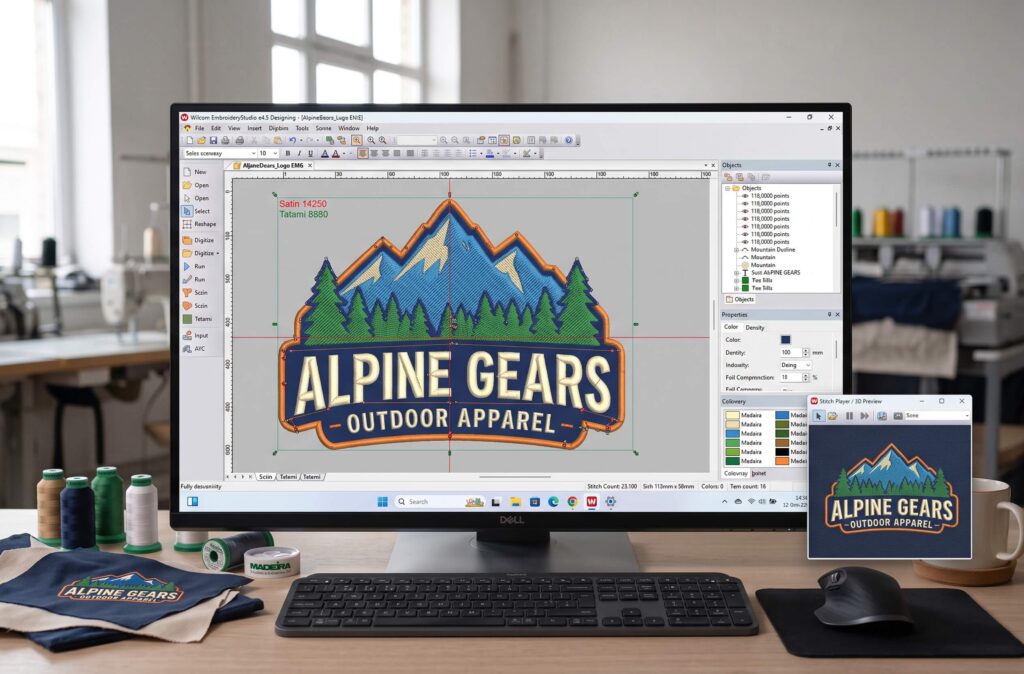
Chest logo embroidery digitizing is the process of turning a logo image into a small, detailed stitch file that an embroidery machine can read, sized for the left chest of a shirt, polo or jacket. The file tells the machine where every stitch goes, in what order, at what length and in which thread color.
A JPG, PNG or even a vector file can’t be embroidered directly. Artwork is made of pixels or paths. Embroidery is made of thread that pulls, pushes and sinks into fabric. A digitizer’s job is to translate one into the other so your logo still looks like your logo once it’s sewn.
Need digitizing for something other than a logo? See our full range of embroidery digitizing services.
How We Convert Your Logo Into an Embroidery File
Send your logo
Upload whatever you have: AI, EPS, PDF, SVG, PNG, JPG, or a clear photo of an existing embroidered garment. Tell us the placement, finished size and fabric.
We review size, placement and fabric
A 3.5-inch left chest logo on a pique polo needs different settings than the same logo on a structured cap. We check fine text, thin lines and small details first, and tell you if anything should be simplified.
A digitizer builds the file by hand
No auto-trace. We set stitch types, underlay, density, pull compensation and the sewing sequence for your exact fabric and size.
Get your files within 24 hours
You receive the machine format you asked for. Need it today? Ask for same-day rush.
Free edits until it sews right
If anything needs adjusting after your test sew-out, we fix it free until the file runs correctly on your machine.
What Makes a Logo File Production-Ready?
A production-ready file sews cleanly the first time, on the fabric it was made for, without the operator babysitting the machine. Here’s what that comes down to, in plain language.
Underlay
A base layer of stitches sewn first. It stabilizes the fabric and lifts the top stitches so they look full, not sunken. Towels and fleece need more; thin performance fabric needs less.
Density
How close the stitches sit. Too dense and the fabric puckers and needles break. Too light and the fabric shows through.
Pull Compensation
Thread pulls fabric inward as it sews, so circles turn into ovals and letters get thinner. We widen shapes slightly in the file so the result matches your artwork.
Stitch Direction and Types
Satin stitches give text and borders a smooth shine. Fill stitches cover larger areas. Run stitches handle fine outlines. Changing stitch angles adds depth.
Pathing, Trims and Jumps
The order each element is sewn. Good pathing means fewer trims, fewer thread breaks and faster run times, which matters when you're sewing 200 polos, not one.
Why Auto-Digitized Logos Fail on the Machine
Auto-digitizing software traces the shapes in your image. It doesn’t know what fabric you’re using, which way the thread will pull, or that tiny text will turn into a blob. The file often looks fine on screen and sews badly:
Puckering
Gaps Between Colors
Fuzzy Lettering
Constant Thread Breaks
For a one-off at home, auto-digitizing can be good enough. For a business logo sewn on dozens or hundreds of garments, a hand-digitized file saves thread, machine time and reprints. More in our guide to professional vs cheap digitizing.
Logo Digitizing by Placement
The same logo usually needs a different file for each placement. Here’s what we adjust.
| Placement | Typical size | What we change in the file |
|---|---|---|
| Left chest polos, dress shirts, scrubs | 3–4 in wide | Tighter detail, lighter density for knits, text kept readable |
| Hat / cap front | Up to about 2.25 in tall, 4–5 in wide | Center-out, bottom-up sewing order so the cap doesn’t shift |
| Jacket back | 10–12 in wide | Split fills, varied stitch angles, extra underlay to prevent puckering |
| Sleeve | 2.5–3.5 in | Narrow layout, reduced detail for a small hoop |
| Bags, totes, towels | Varies | Heavier underlay for thick or looped fabric |
Left Chest and Polo Logos
The most common logo we digitize. Knit polos stretch, so we control density and underlay to keep edges crisp.
Hat and Cap Logos
Structured caps have a center seam and a curved front. We sequence the design from the center outward so the logo sews straight. Read more about hat logo digitizing.
Jacket Backs and Large Logos
Big fills pull hard on fabric. We break them into sections and vary stitch angles so the back panel lies flat.
Sleeves, Bags and Towels
Small sleeve logos need simplified detail. Towels need an extra layer so stitches don't sink into the loops.
Small Logos, Fine Text and Detailed Artwork
Small text is where most logo files fail. As a guide, lettering under about 0.25 inches (6 mm) tall gets hard to read in satin stitch, and very thin lines can disappear into the fabric.
When your logo has tiny taglines, gradients or hairline details, we’ll suggest practical options:
- Enlarging the text slightly
- Switching to a run stitch
- Dropping a detail that won't show at that size
Minimum lettering height for text that stays readable in satin stitch.
Smaller than that? We will flag it before digitizing and recommend the best fix for your size and fabric.
3D Puff and Applique Logos
3D Puff
Stitches are sewn over foam so the logo stands out from the cap. It works best with bold letters and simple shapes, and needs denser satin columns so the foam tears away cleanly. Learn more about 3D puff embroidery digitizing.
Applique
A fabric piece is stitched down instead of filling a large area with thread. Ideal for varsity letters, jacket backs and team logos. The file includes a placement line, tack-down stitch and satin border.
Embroidery File Formats We Deliver
Tajima, Ricoma, SWF, Happy and most commercial machines
Barudan
Brother, Baby Lock
Melco, Bernina
Janome
Husqvarna Viking, Pfaff
Singer
We deliver any format on request. Tell us your machine model and we’ll send the right file.
Logo Digitizing Pricing
Pricing is based on where the design goes and how detailed it is. A standard left chest logo is $12 and a detailed one is $18. You get an exact quote before any work starts.
| Design | Price | Typical example |
|---|---|---|
| Left chest or small logo, standard | $12 | Up to 5 inches: polos, tees, bags and sleeves |
| Left chest or small logo, detailed | $18 | Over 15,000 stitches, small text or gradients |
| Cap or hat front | $15 to $20 | Structured and unstructured caps |
| 3D puff | $20 to $28 | Raised foam logos on caps and jackets |
| Large chest, sleeve or bag | $25 to $32 | Designs from 5 to 8 inches |
| Jacket back or full front | $35 to $50 | Designs up to 12 inches |
| Oversized designs | Never above $65 | Over 12 inches, quoted first |
Examples are typical ranges, not fixed. See all rates on our pricing page.
Turnaround Time and Revisions
Standard Delivery
Within 24 hours of your approved quote.
Same-Day Rush
Available on request.
Free Revisions
Free edits until the file sews correctly on your machine.
Your File, Your Rights
Once paid, the file is yours to use in production.
Resizing
Changes above about 20% usually need re-digitizing, not just scaling. We'll tell you when that's the case.
Recent Embroidery Digitizing Work
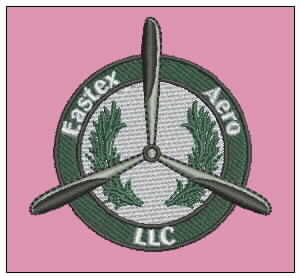
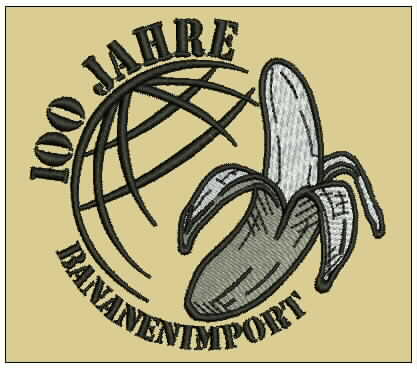
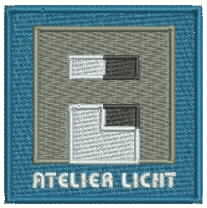
Before and after: the original artwork next to the finished embroidery file. Click any image to see it full size.


Who We Work With
Embroidery Shops and Contract Embroiderers
Shops that want a dependable outside digitizer for overflow or every order.
Apparel Decorators and Print Shops
Adding embroidery without hiring an in-house digitizer.
Hat Businesses
Cap-ready files and 3D puff that sew straight on structured caps.
Custom Clothing Brands
Building a consistent look across polos, hoodies and jackets.
Small Businesses
Putting their logo on staff uniforms for the first time.
Serving Embroidery Shops Across Texas and the USA
XcellentPlus works remotely with embroidery shops and businesses across the United States. You upload your logo online, we deliver files by email, and your machine sews them the same way wherever you are.
Texas has a large embroidery and uniform market, from workwear and safety uniforms for Houston’s energy and industrial companies, to team apparel, school spirit wear and corporate polos across Dallas–Fort Worth, Austin and San Antonio. We digitize logos for all of these uses and match the placement and fabric your customer needs.
HoustonDallas–Fort WorthAustinSan AntonioNationwide USA
We don’t have a local storefront in Texas. What we offer is fast online digitizing, delivered within 24 hours, with same-day rush when your order can’t wait.
Why Businesses Choose XcellentPlus
A real team
Since 2019 we’ve grown from 4 designers to a team of 25–30. Meet the team behind XcellentPlus.
Hand-Digitized
Every logo is built by a digitizer for your fabric and placement, never auto-traced.
Clear Pricing
Stitch-count tiers from $12, quoted before we start.
Free Edits
We adjust the file until it sews right on your machine.
Digitizing, Vector and Patches
One partner for your stitch file, your print-ready vector and your custom patches.
Need the Vector File Too?
If your logo is a low-resolution JPG, you’ll probably also need a clean vector for screen printing, DTF or signage. We can redraw your logo as a vector (AI, EPS, SVG, PDF) alongside the embroidery file. Want it as a patch instead? See our custom embroidered patches.
Logo Digitizing FAQs
Quick answers to the questions we hear most from embroidery shops, decorators and brands.
Still have a question?
Send us your logo and tell us about your machine. We'll reply with a quote and answers.
Ask Us Anything01How much does it cost to digitize a logo for embroidery?
Most left chest and cap logos fall under 15,000 stitches, which is $12 with XcellentPlus. Larger designs are priced by stitch count, up to $50 for about 65,000 stitches. You get an exact quote before work starts.
02What file do I need to send?
Any file works. A vector (AI, EPS, SVG, PDF) gives the cleanest result, but a high-resolution PNG or JPG, or a clear photo of an existing embroidered item, is fine.
03Which embroidery file format will I get?
Whichever your machine uses. DST for most commercial machines like Tajima, DSB for Barudan, PES for Brother and Baby Lock, EXP for Melco and Bernina, JEF for Janome, VP3 or HUS for Husqvarna Viking and Pfaff, and XXX for Singer. Other formats are available on request.
04How long does logo digitizing take?
Logos are delivered within 24 hours of your approved quote. Same-day rush is available on request.
05Can I use the same file for a shirt and a hat?
Usually not. Caps need a different sewing sequence and often simplified detail, so we recommend a separate cap version of your logo.
06Can I resize my embroidery file myself?
Small changes of around 10–20% are usually fine. Beyond that, density and detail need to be rebuilt, so ask us for a resized version.
07What's the smallest text you can embroider?
About 0.25 inches (6 mm) tall is a practical minimum for clean satin lettering. Smaller text may work in a run stitch on smooth fabric.
08Do you offer revisions?
Yes. We make free edits until the file sews correctly on your machine.
09Can you digitize logos for 3D puff?
Yes. Puff works best on bold shapes and letters. We'll tell you if parts of your logo should be flat stitched instead.
10Do I own the embroidery file?
Yes. Once paid, the file is yours to use for your own or your customers' production.
11Do you work with shops outside the USA?
Yes. We started out serving US clients and now also work with shops in Canada, the UK, Australia, Germany and France.
Get a Free Quote on Your Logo
Send your logo with the size, placement and machine format you need, and we’ll reply with an exact price. No commitment.
Or email xcellentplus@gmail.com